If you can use Word, you can build a website.
AI Assist writes the first draft. Then keep going: with AI, on your own, or both.
The zero-codeAI website builder.
Pick from nine site types, each built for its job. Answer a few questions in the EZ Start Wizard and get a drafted home page — then build it out, one block at a time.
- Text
- Images
- Audio
- Streaming video
- Files
Free 30-day trial · No credit card · Mobile-first & SEO-ready
- 01Website
Full business websites
- 02Microsite
A network of sites, one login
- 03Blog
Standalone blog & newsletter
- 04Podcast
Episodes, players & RSS
- 05Documentation
Product docs & API refs
- 06Knowledge Base
Help centers & wikis
- 07Job & Career Sites
Boards & applicant capture
- 08Landing Pages
Single-page conversion
- 09Resume & Portfolio
Personal sites & CVs
From zero
to live.
Start with the wizard — it scaffolds a real, good-looking site in a few minutes. Then take over the canvas and build it out, one block at a time, in a true what-you-see-is-what-you-get editor. No code at any step.
Spin up a site in minutes.
Six short steps — name it, pick a style, set the nav, drop in a logo, choose your pages, preview. The wizard hands you beautiful scaffolding right out of the box: a hero, working navigation, and the starter pages for the kind of site you’re making.
- →One question at a time, in plain language
- →Tuned defaults per site type — podcast, docs, blog, and more
- →Skip straight to the editor whenever you want
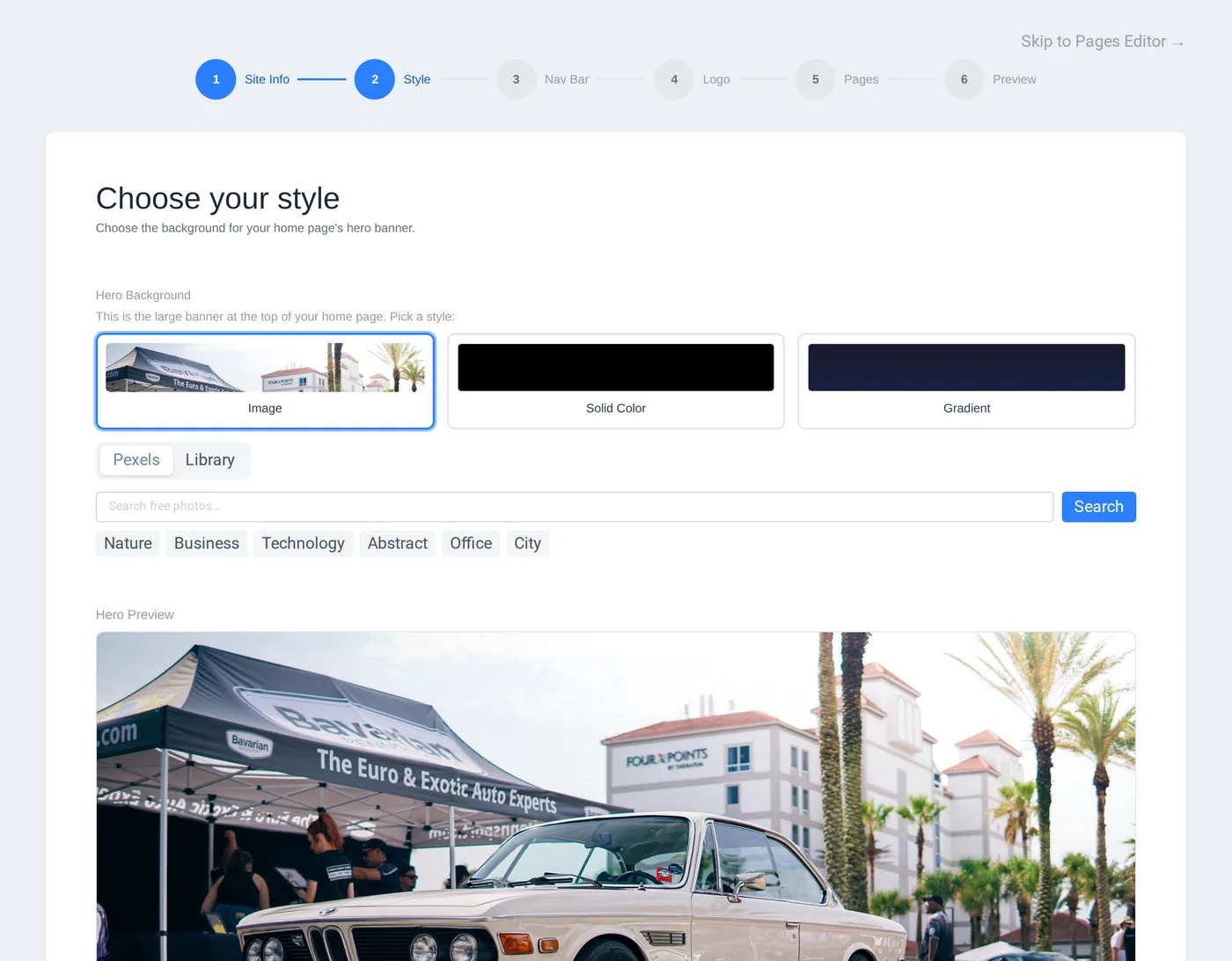
Already set up? The wizard steps aside and drops you straight into the editor.
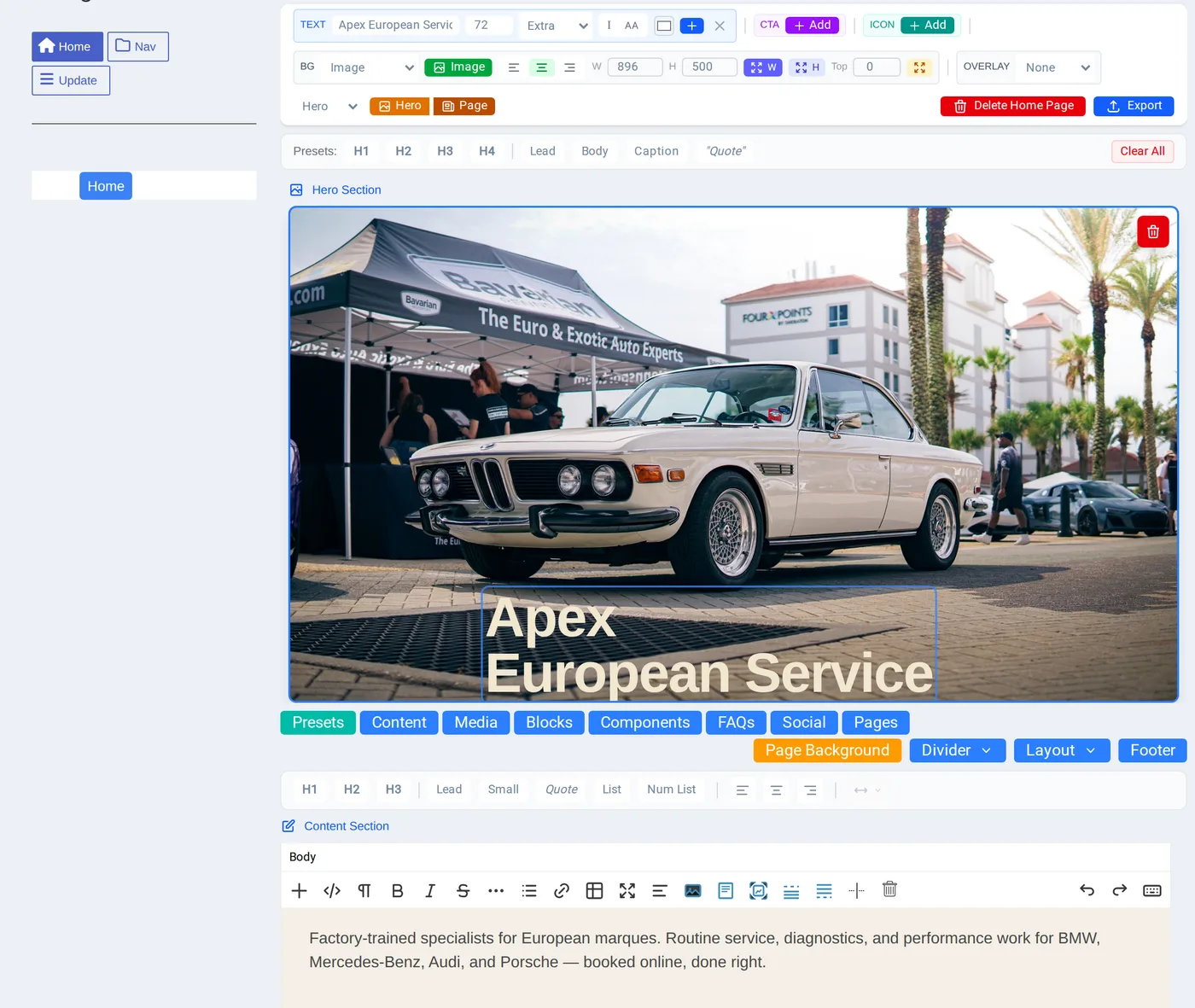
Add blocks from the toolbar; edit copy inline with the Imperavi Redactor WYSIWYG editor.
Piece by piece, in place.
Add a block, edit it right where it sits. Headlines, copy, images, galleries, pricing, FAQs, forms — you click into the page and change it directly. Rich text runs on the Imperavi Redactor editor, so formatting feels like a word processor, not a config screen.
- →True WYSIWYG editing — what you build is what ships
- →Navigation builds itself as you add pages — dynamic navs, no wiring
- →Grow a site one block at a time — nothing has to be finished up front
One platform. Nine ways to use it.
Nine subscription products, all zero-code. The two flagship builders — Website andMicrosite — can host every focused type below as a sub-project: a blog, a podcast, docs, a knowledge base, a job board, landing pages. Resume & Portfolio is the exception — a complete product all on its own.
Website Builder
Full business websites
Microsite Builder
A network of sites, one login
Blog Builder
Standalone blog & newsletter
Podcast Builder
Episodes, players & RSS
Documentation
Product docs & API refs
Knowledge Base
Help centers & wikis
Job & Career Sites
Boards & applicant capture
Landing Pages
Single-page conversion
Resume & Portfolio
Personal sites & CVs
Every site type is mobile-first & SEO-optimized · Each is its own subscription
Everything a site
needs, built in.
The features a real site runs on don’t come from a marketplace of plugins — they’re part of the platform. Forms, newsletters, events, job postings, and assets all work out of the box, with the same zero-code editing as the rest of your site.
AI Assist, from first draft to final edit.
- In the EZ Start Wizard
- Describe your site and AI Assist drafts the home page — the hero and the sections below it — so you never start from a blank page.
- In the editor
- Select any text and tell AI Assist what you want — shorter, friendlier, more detail — and it rewrites it in place.
Monthly AI allowance varies by plan.
Pages & dynamic navs
Add a page and the navigation updates itself. Build the structure as you go.
Inquiry & contact forms
Capture leads and messages with built-in forms — no third-party embed.
Newsletter & email
Collect subscribers and send email campaigns from inside your site.
Events & RSVP
Publish event pages and take RSVPs without a separate tool.
Jobs & applicants
Post openings to a careers page and collect applications in one place.
Calls-to-action
Drop in CTA buttons, links, and banners that convert — zero code.
One library for everything you upload. Reuse any asset across pages and sites.
- Images
- Video
- Audio
- Files
- Icons
First-class embeds and links for the platforms your audience already lives on.
- YouTube
- Vimeo
- X / Twitter
Mobile-first & responsive
Every site renders cleanly from phone to desktop — designed small-screen first, not squeezed down later.
SEO-optimized output
Each site type renders with structure, metadata, and markup tuned for search — handled for you, per type.
The difference,
itemized.
Most builders give you one site type and make everything else a plugin, an embed, or a second tool. CloudHoot puts nine site types and the business features they need on one zero-code platform. Here’s what that changes day to day.
Getting started
Pick a template off a wall, then spend the first hour deleting demo content you don't want and fighting a layout you didn't choose.
The EZ Start Wizard asks a few questions and hands you a real, good-looking site — hero, navigation, and starter pages — in minutes.
Range of sites
One tool per job: a blog platform here, a docs tool there, a separate host for your podcast. Different logins, different bills, different skills.
Nine site types on one platform. Website and Microsite can even host a blog, podcast, docs, or job board as a sub-project of one site.
Business features
Forms, newsletters, events, and job postings are bolt-ons — third-party embeds and plugins you wire up, maintain, and pay for separately.
Inquiry forms, newsletters, email campaigns, events, RSVPs, job postings, and CTAs are built in and edited the same zero-code way.
Editing
Either a rigid config panel that hides how things really look, or raw markup the moment you want something specific.
True WYSIWYG. Click into the page and change it where it sits — rich text runs on the Imperavi Redactor editor. What you build is what ships.
Mobile & SEO
Responsiveness and search optimization are your problem — extra settings, extra plugins, or a developer to get it right.
Every site type is mobile-first and renders with SEO-tuned structure and metadata by default. Handled for you, per site type.
One platform · Nine site types · Zero code
Build the site
you actually wanted.
CloudHoot opens to subscribers soon. Leave your email and we’ll send one note when it does — then it’s thirty days free, no credit card, and something real on the screen in minutes.
- trial
- 30 days, full access
- card
- No credit card needed
- site types
- All nine to choose from
- no code
- Zero code, start to finish